Welcome, ID Card Group customers! IDCardGroup.com has transitioned to Levata.com - your trusted ID solutions are still here, now with access to even more products and resources.
Welcome, IT Planet customers! ITPlanet.com has transitioned to Levata.com - your trusted technology solutions are still here, now with access to even more products and resources.
Welcome, Barcode Planet customers! BarcodePlanet.com has transitioned to Levata.com - your trusted technology solutions are still here, now with access to even more products and resources.
Your cart is emptyContact us if you have any questions or problems
Warranty details
—
Incl. VAT
Are you sure you want to remove this item from the shopping cart?
Discount
Shipping & Handling
FREE SHIPPING
TAX
News & Highlights
Rugged tablet vs iPad: the real cost of going cheap
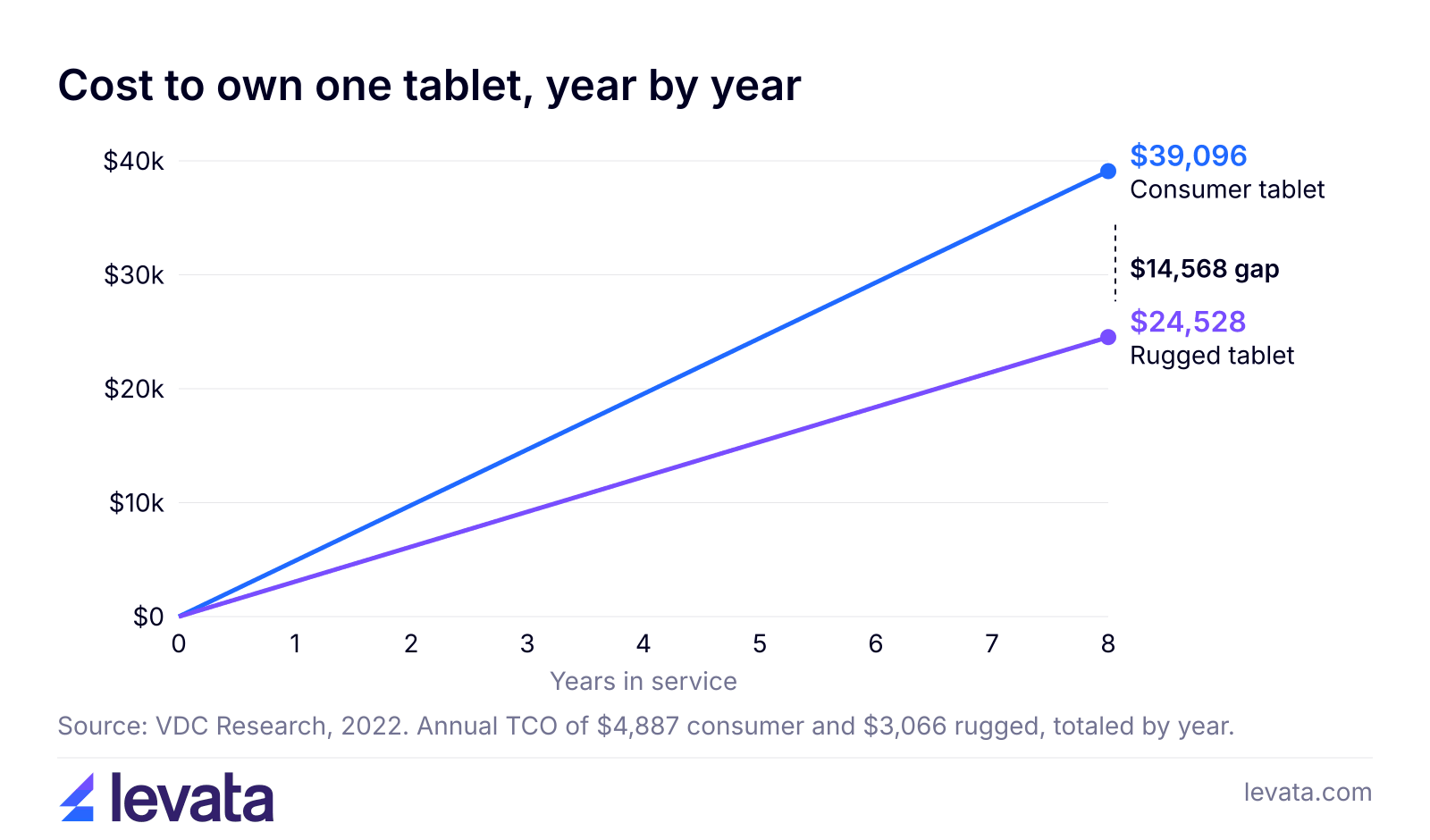
In a rugged tablet vs iPad comparison, the rugged tablet costs more to buy but usually less to own in warehouse, healthcare, vehicle and field work where application use and environmental challenges are better suited for rugged tablets. VDC Research puts average annual total cost of ownership (TCO) at $4,887 for a consumer tablet and $3,066 for rugged, because consumer tablets fail more often. For gentle, indoor, customer facing work, an iPad is often the better buy.
That is the short answer to a rugged vs consumer tablets question. The rest of this guide shows where the money goes, with sourced numbers you can put into your own budget.
What is the difference between a rugged tablet and an iPad?
The difference between a rugged tablet and an iPad is that a rugged tablet is sealed, reinforced and rated for drops, water, dust and temperature, while an iPad is built for light, indoor use. Both run modern apps on a good touchscreen. The gap shows up the first time the device hits concrete, is exposed to a freezer or gets considerably wet.
An iPad is a well-made consumer device but most models, like the iPad 11 with A16 chip, is rated to operate from 32° to 95° F, which rules out cold storage, winter yards and a hot truck cab in July. It carries no published IP rating for water or dust.
Rugged tablets are designed from the frame out for the job. They carry an IP rating, a code defined in IEC 60529 where the first digit covers solids and the second covers water. Our guide to IP ratings explained walks through what each number means for a tablet.
What you are comparing
iPad (consumer tablet)
Rugged tablet
Water and dust rating
No published IP rating
IP65 to IP68 on the models Levata carries
Operating temperature
32° to 95° F
Wider range, varies by model
Drop and vibration testing
Not published
Tested to MIL-STD-810H on many models
Battery
Sealed, charge between shifts
Replaceable or hot swap on many models
Barcode scanning
Camera only
Integrated scan engine on many models
Vehicle and forklift docking
Third party mounts
Manufacturer docks and vehicle power
Typical buyer
Office, sales, customer facing retail
Warehouse, field service, public safety, healthcare
How much more does a rugged tablet cost than an iPad?
A rugged tablet costs more than an iPad up front, and the gap widens as the protection goes up. The entry iPad (A16) starts at $429 in the US. A purpose-built rugged option such as the Samsung Galaxy Tab Active5 starts at approximately $640, and fully rugged Windows tablets for field and public safety work tend to cost more.
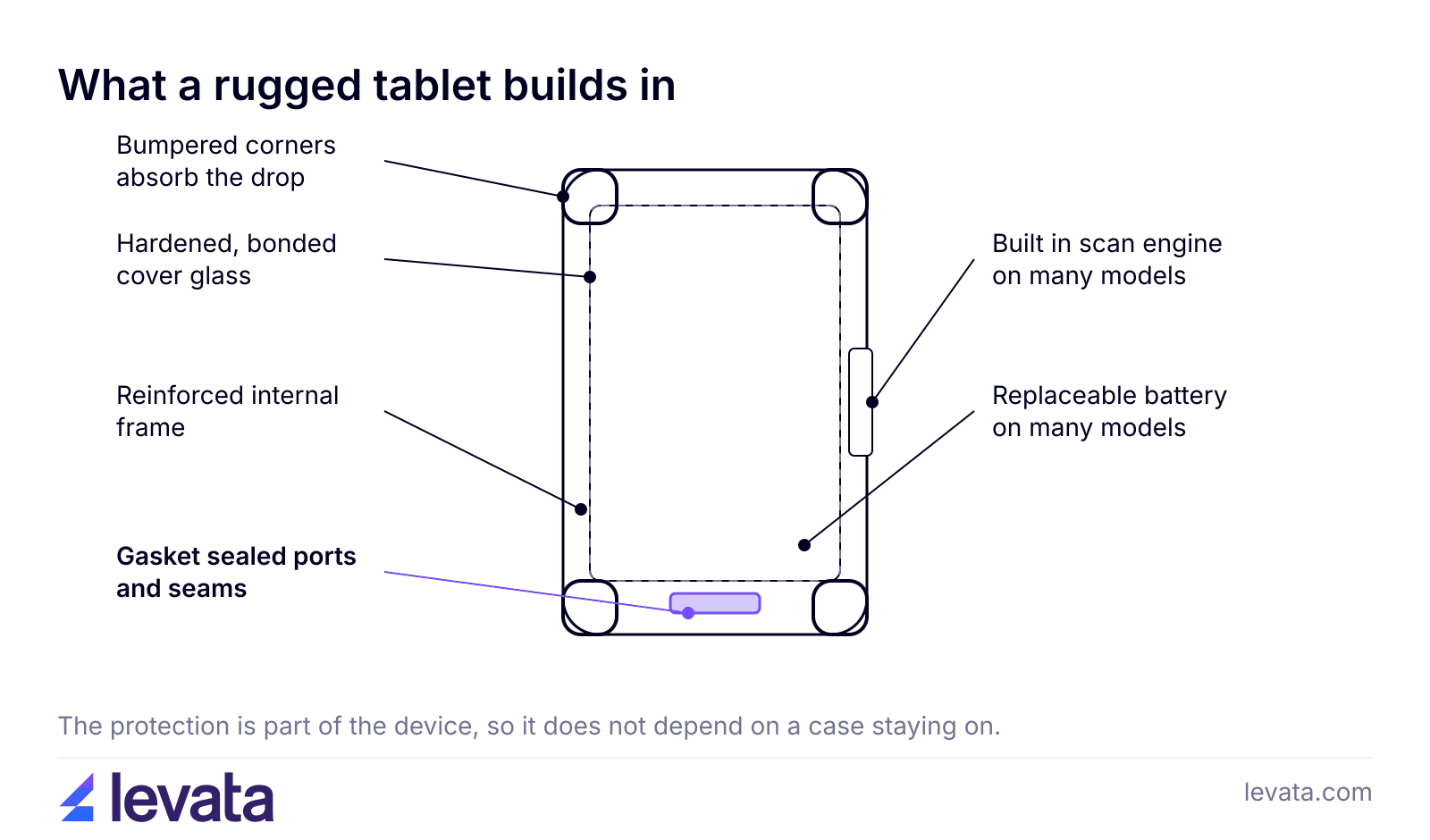
The price gap comes from the build. Rugged tablets use sealed ports, reinforced frames and parts rated for wider temperatures, and each model stays in production for years. They also miss out on the volume discounts consumer device makers get, so engineering costs are spread across fewer units.
The sticker price is the smallest part of the bill. The next three sections cover the parts that decide whether the cheaper tablet stays cheaper.
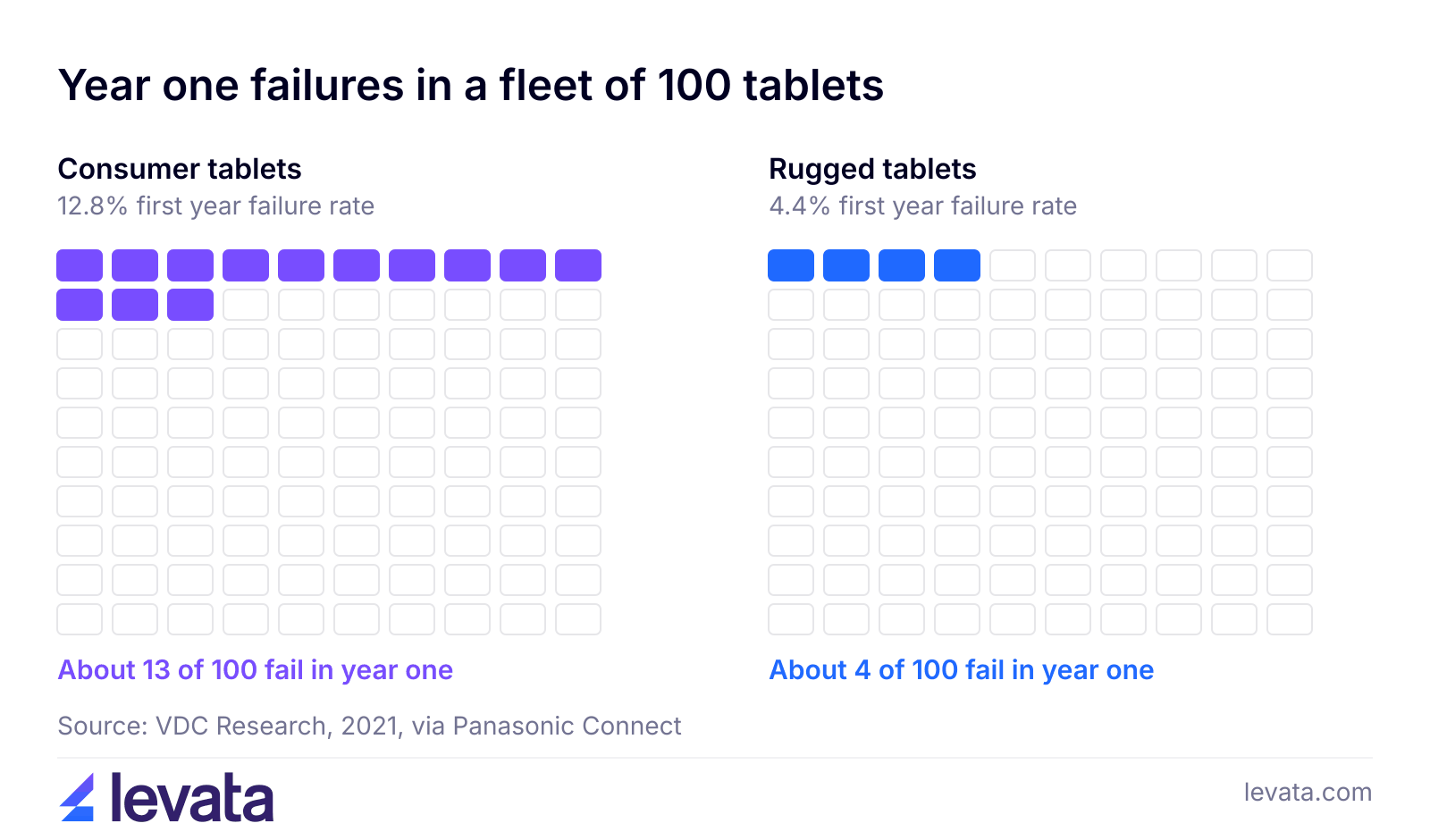
Failure here means more than a shattered screen. It covers any problem bad enough to need a help desk ticket or a swap: a cracked digitizer, a dead charging port, a battery that will not last a shift, or a device that keeps dropping off Wi-Fi. VDC also found consumer devices are 28% more likely to have wireless connection problems that slow work down.
In a fleet of 100 tablets, the difference between about 4 and about 13 first year failures sounds small. It is not, because each one of those failures carries a cost that never shows up on the purchase order.
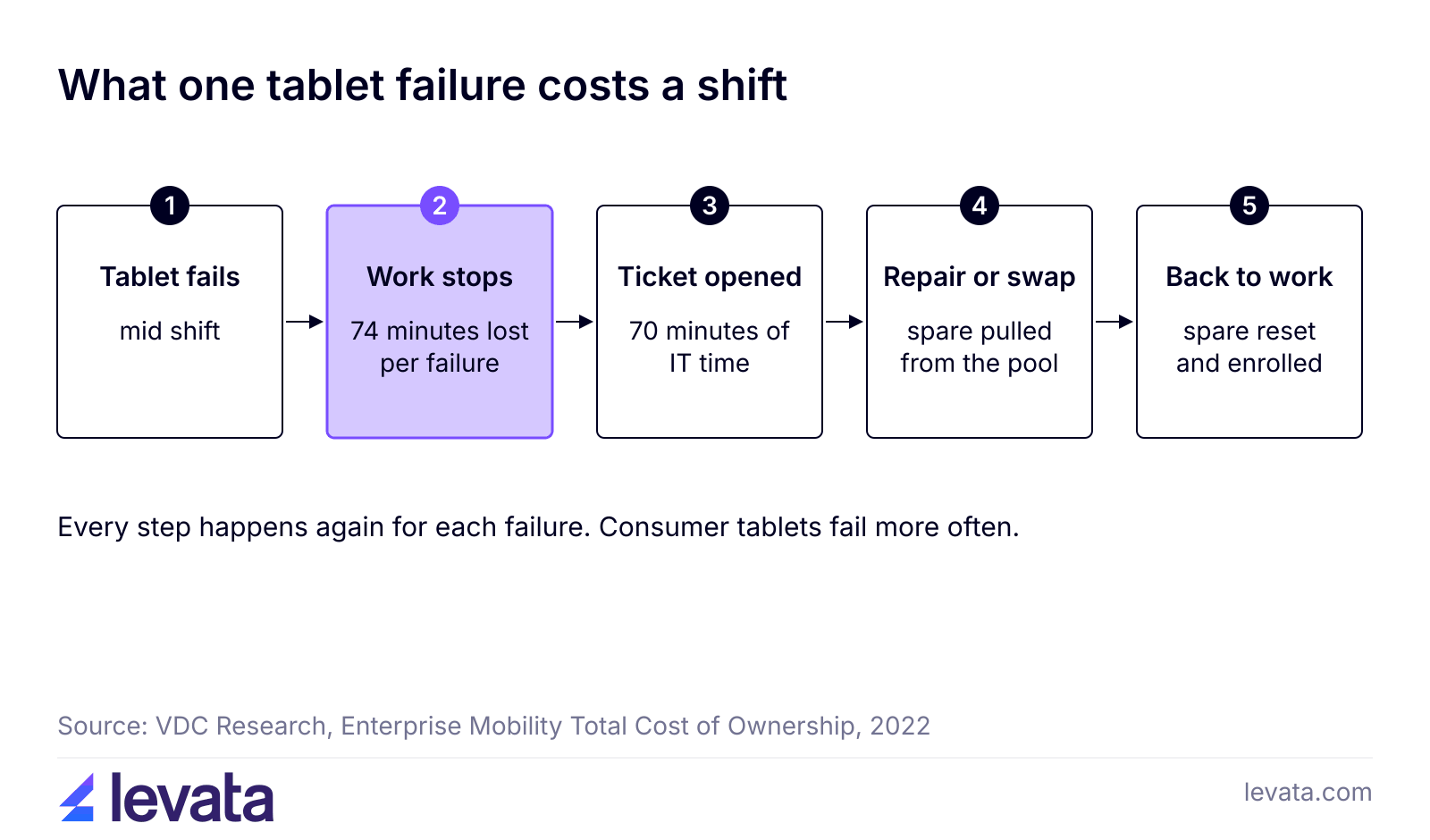
Consumer devices also generate 20% more support tickets than rugged ones, according to the same VDC data. More tickets means more swaps, more reimaging and a bigger spare pool sitting in a drawer.
Think about what 74 minutes means on a real shift. A picker on a dock stops scanning. A delivery driver cannot capture a signature. A home health nurse switches to paper and types it all in again later. The tablet repair might be covered, but the lost hour is not.
TCO counts the device plus everything it takes to keep it working: IT support, repairs, replacements and the work lost when it fails. The purchase price is only one line in that list.
Here is the math for a fleet, using the VDC annual figures:
Fleet of 50 tablets
Consumer tablet
Rugged tablet
Annual TCO per device
$4,887
$3,066
Annual TCO for the fleet
$244,350
$153,300
Difference per year
$91,050 more
Baseline
Cost per device over 8 years
$39,096
$24,528
Difference per device over 8 years
$14,568 more
Baseline
Swap in your own fleet size and the gap scales with it. These are averages across many deployments, so a team that treats its tablets gently will see less difference, and a team that drops them daily will see more.
Does a rugged case turn an iPad into a rugged tablet?
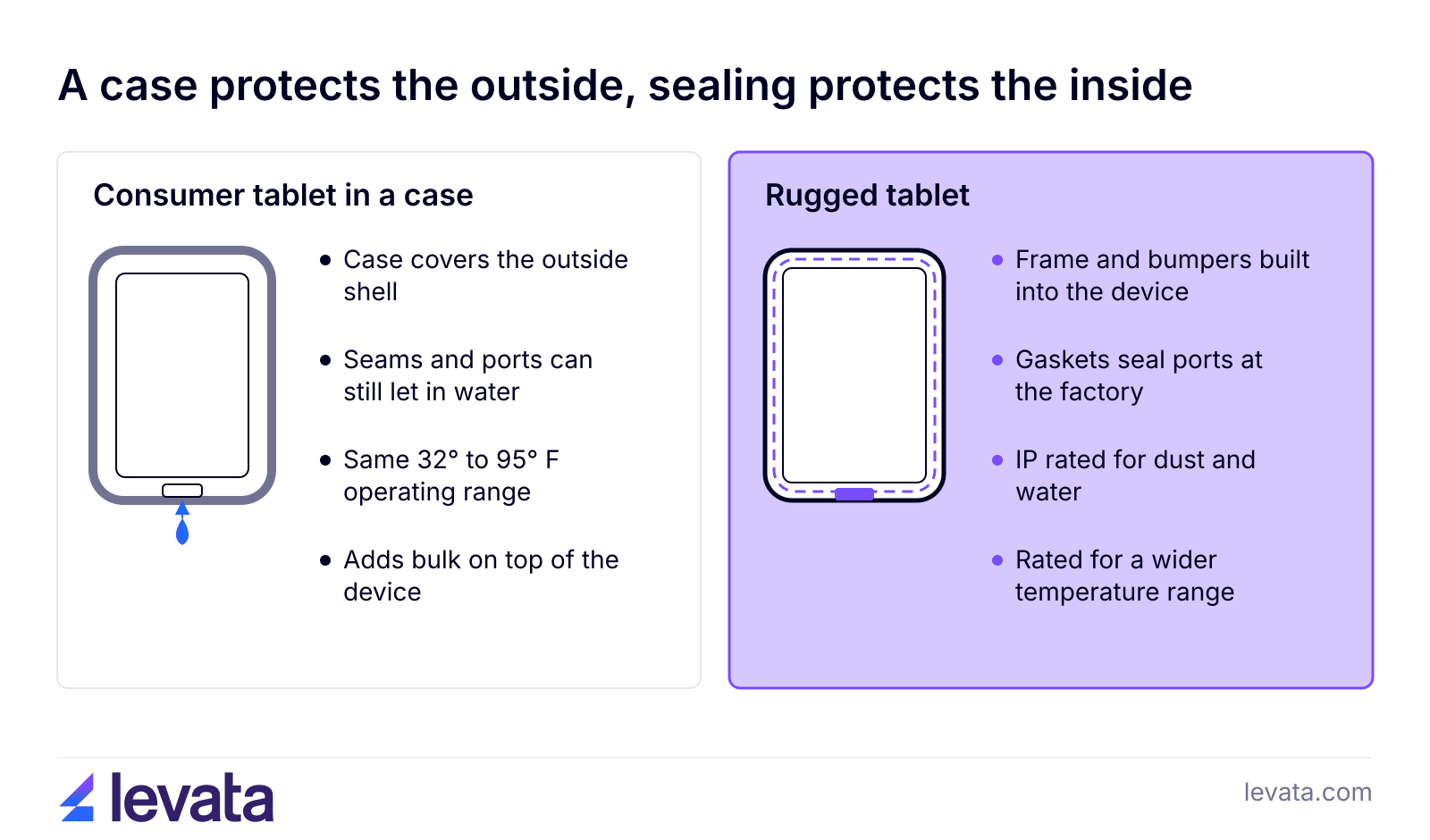
A rugged case does not turn an iPad into a rugged tablet, but it does help with drops in light duty work. A case protects the outside. It does not seal the ports, widen the temperature range or add a scan engine, and it adds bulk.
Cases do have a place. iPads in rugged cases are common in customer facing retail, where the device should look familiar and rarely leaves the counter. mounting a consumer tablet on a forklift is not recommended, case or no case.
How long does a rugged tablet last compared with an iPad?
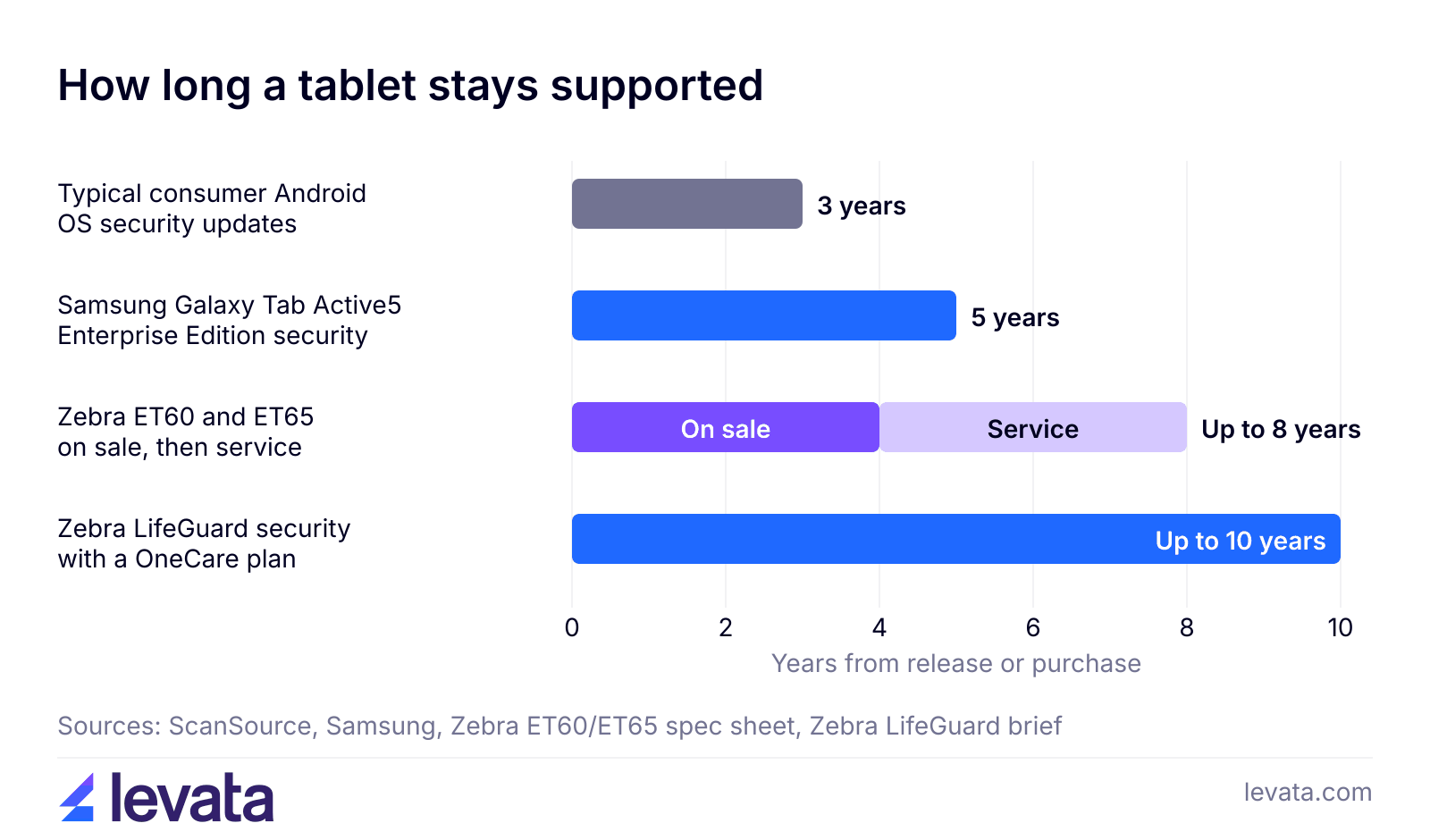
A rugged tablet usually lasts longer than an iPad in business use, both as hardware and as a supported, secure device. Hardware life matters, but software support often decides when a tablet has to be retired.
There is a quieter cost too. Consumer models change every year or two, so a fleet bought in waves ends up with three generations of tablets, cases, chargers and mounts. A rugged model that stays on sale for years lets you buy replacements that match the rest of the fleet, which keeps your accessories and your app testing simple.
Can a deployment and lifecycle partner make tablets last longer?
A deployment and lifecycle partner can make any tablet last longer, consumer or rugged, because most of a tablet’s working life depends on how it is set up, patched, repaired and replaced. The hardware sets the ceiling. The services around it decide how close a fleet gets to that ceiling.
Staging and configuration. With Stage, Kit, Configure, every tablet arrives loaded with your apps, settings and accessories, so the fleet starts out identical and no device is set up by hand on the floor.
Mobile device management. An MDM platform lets IT push security updates, deploy apps, and lock or wipe a lost tablet from one console. That is how a fleet actually uses the security support windows covered above.
Help desk and repair.TrueSupport Help Desk and Repair handles troubleshooting and sends a device to depot repair when it needs it. The repair, reconfigure and refurbish program returns each unit configured and ready to deploy, so a broken tablet goes back into service instead of being written off.
Advance exchange. With Advanced Exchange, a replacement from a managed spare pool ships before the failed unit leaves your site. This goes straight at the 74 minutes of lost work per failure, because the worker is not waiting on a repair.
Services make a consumer tablet easier to own, but they cannot seal its ports or widen its temperature range. They help most when they are paired with hardware that fits the job. On a rugged fleet they help a long service life pay off. On an iPad fleet they keep the higher failure rate from turning into extra downtime.
When is an iPad the right choice for business?
An iPad is the right choice for business when the work is indoors, the device rarely gets dropped, and the people holding it are customers, managers or sales staff. In that setting its lower price and familiar design win, and a rugged tablet would be paying for protection you do not use.
Good fits for an iPad or other consumer tablet:
Front of house in retail and hospitality, such as line busting, catalogs and sign in kiosks
Sales presentations, quoting and executive dashboards
Training rooms and classrooms with a cart and a case
Short projects where the tablets will be replaced in under three years anyway
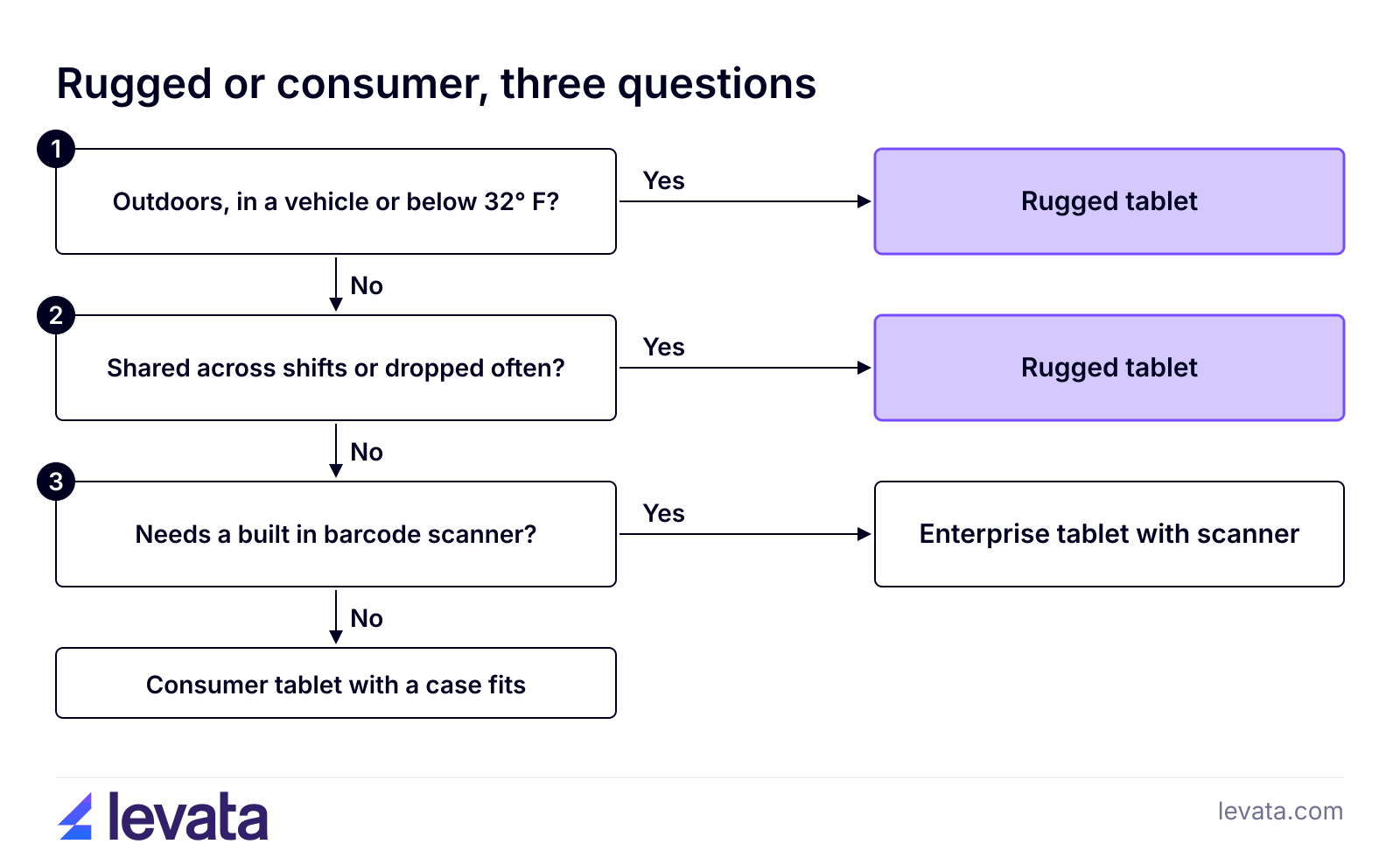
Choose rugged when any of these are true: the tablet is used outdoors or below freezing, it is shared across shifts, it gets mounted on a vehicle, it needs a real barcode scanner, or a dead device stops revenue. Levata sells both, so the recommendation follows the job.
Which rugged tablet fits which job?
The rugged tablet that fits your job depends on how harsh the environment is and how the device gets carried, mounted and charged. Most buyers fall into one of four groups, and the rugged tablets range covers each of them.
Hospitals and clinics have their own needs, such as housings that stand up to frequent disinfecting, so start with rugged healthcare tablets for that work.
If you are rolling out a fleet, Levata’s field deployment services cover site surveys, installation and onsite support, so the first week of a new tablet program does not turn into its own downtime.
Frequently asked questions
Do rugged tablets run the same apps as an iPad?
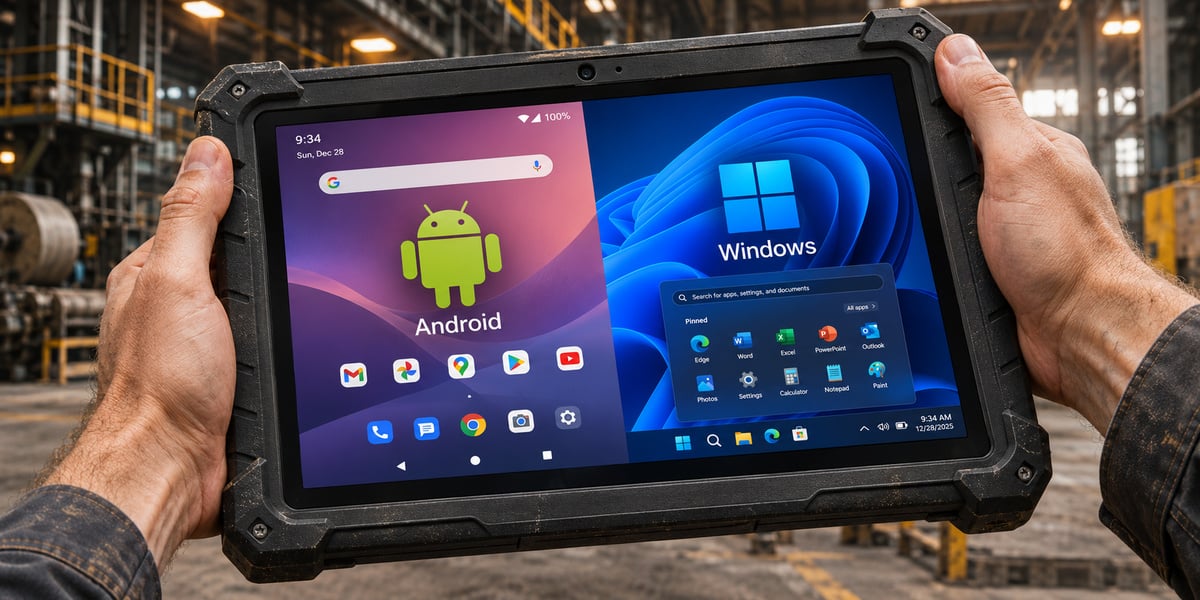
Rugged tablets run Android or Windows, so they do not run iPadOS apps. Most business apps, such as warehouse, field service and EMR software, ship Android, Windows or browser versions, so check your app list before you switch. If one app only exists on iPadOS, that can decide the platform on its own.
What does MIL-STD-810H mean on a tablet?
MIL-STD-810H is a US military test standard for how equipment holds up to drops, vibration, temperature, humidity and more. Manufacturers pick which tests to run, so the label alone does not tell you much. Samsung, for example, notes its Tab Active5 was tested against a subset of 21 conditions and does not guarantee performance in every extreme. Ask which tests and what drop height before you compare two tablets.
Is a refurbished rugged tablet a good middle ground?
A refurbished rugged tablet can be a good middle ground if it still has years of security updates left. Check the model’s support end date and battery health before you buy. A cheap unit that loses security support next year will have to be replaced early, just like a consumer tablet.
Does AppleCare+ make an iPad fleet cheaper to run?
AppleCare+ lowers the repair bill for each accidental damage incident, but it does not cover the hours lost while the device is out. Apple charges a service fee per incident, and the tablet still has to be sent in or swapped. For a fleet, that downtime and the IT time behind it are the larger cost.
Find the right tablet for your fleet
Going cheap on tablets only saves money when the work is gentle. For everything else, a rugged tablet that stays in service for years is the lower cost choice. Tell us how many devices you need, where they work and what apps they run, and we will price both options side by side.
Large mobile fleets can bury internal IT teams. Learn how managed mobility helps manufacturers reduce IT workload, minimize device downtime, strengthen security, and keep frontline workers connected and productive.
Growing mobile device fleets can strain internal IT teams. Learn how Device-as-a-Service and Infrastructure-as-a-Service models help T&L companies reduce IT workloads, minimize downtime, control costs, and scale technology.
On September 24th, IDCardGroup.com transitioned to Levata.com. You still have access to the ID solutions you rely on, along with a broader selection of data capture and technology solutions.
What you can expect:
More solutions: A broader portfolio of ID, data capture, and technology products.
Personalized service: The one-on-one support you’ve come to expect, backed by Levata’s broader resources and expertise.
A better online experience: Easier access to products, information, and educational resources to help you find the right solution.
Questions? Call 1-833-353-8282.
Thank you for choosing Levata.
Welcome, IT Planet customers!
On September 24th, ITPlanet.com transitioned to Levata.com. You still have access to the products you rely on, along with a broader selection of data capture and technology solutions.
What you can expect:
More solutions: A broader portfolio of ID, data capture, and technology products.
Personalized service: The one-on-one support you’ve come to expect, backed by Levata’s broader resources and expertise.
A better online experience: Easier access to products, information, and educational resources to help you find the right solution.
Questions? Call 1-833-353-8282.
Thank you for choosing Levata.
Welcome, Barcode Planet customers!
On September 24th, BarcodePlanet.com transitioned to Levata.com. You still have access to the products you rely on, along with a broader selection of data capture and technology solutions.
What you can expect:
More solutions: A broader portfolio of ID, data capture, and technology products.
Personalized service: The one-on-one support you’ve come to expect, backed by Levata’s broader resources and expertise.
A better online experience: Easier access to products, information, and educational resources to help you find the right solution.