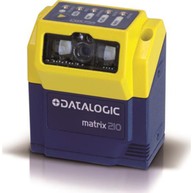
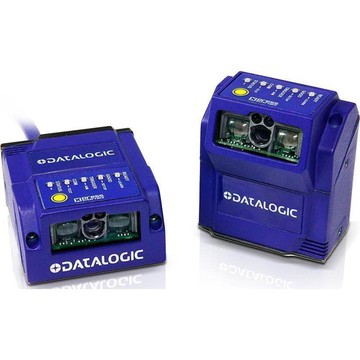
Select model
Prices could not be updated.
Same-day shipping
on orders placed before 2:00 p.m. CT
Secure payment with

Description
The Datalogic Matrix 200 group contains fixed-mount image-based barcode readers for installation in automated equipment. The range includes WVGA configurations with different reading arrangements and host connections.
Use the individual reader part number to select the optical and interface configuration. Mounting, connection equipment and accessories should be matched to that reader; accessory products listed with the family are not complete scanners.
Documents

FAQs
What barcode symbologies can the Datalogic Matrix 200 read?
The Matrix 200 reads 1D and Stacked symbologies including Code 128, Code 39, EAN/UPC, PDF417, Micro PDF417, Pharmacode, and the GS1 DATABAR family; 2D symbologies including Data Matrix, QR Code, Maxicode, Aztec, and Microglyph; and Postal symbologies including Royal Mail, Japan Post, Planet, and Postnet.
What is the ingress protection rating and operating temperature range of the Datalogic Matrix 200?
The Matrix 200 carries an IP65 protection class and operates from 0 to 50 °C (32 to 122 °F), making it suited for demanding industrial environments.
What communication interfaces does the Datalogic Matrix 200 support?
It supports RS232 plus RS232/RS422/RS485 up to 115.2 Kbit/s, an embedded ID-NET port up to 1 Mbps, and USB 2.0 up to 921.6 Kbit/s, with connectivity modes including Pass Through, Master/Slave, Multiplexer, and USB Point To Point.
What image sensor and frame rate does the Datalogic Matrix 200 use?
It uses a WVGA (752 x 480) CMOS sensor with a global shutter and achieves an acquisition rate of up to 60 frames per second.
Can the Datalogic Matrix 200 be used to verify code quality, and which standards does it support?
Yes, the Matrix 200 can function as a code quality verifier and supports ISO/IEC 16022, ISO/IEC 18004, ISO/IEC 15415, ISO/IEC 15416, AS9132A, and AIM DPM standards.
How is the Datalogic Matrix 200 configured during installation?
Configuration can be performed without a PC using the built-in X-PRESS Human Machine Interface, which provides Aim, Setup, Learn, and Test functions via a single push button and five-LED bar graph; alternatively, the Windows-based VisiSet software can be used via a serial or USB connection, or configuration can be done through Serial Host Mode Programming sequences.
Showing of products